
- Introduction
SmartDetect is a portable, AI-powered platform designed for the on-site detection of cadmium (Cd²⁺) contamination in water. It uses a trained machine learning model to analyze colorimetric changes in a nanosensor reagent and outputs predicted ion concentrations in nanomolar (nM). The system is intended for researchers, field technicians, and environmental analysts seeking a rapid alternative to traditional lab-based heavy metal detection.
2.System Components
- SmartDetect Web Interface (accessible via any modern browser)
- Sample Preparation Kit (provided separately):
- SmartDetect Chamber
- Silver nanosensors (AgNS@NLE for Hg²⁺ detection, AgNS@TPE for Cd²⁺ detection)
- Droppers
- Test tubes/vials
- Camera or Mobile Phone for capturing sample images
- Pure (Deionized) water for controls and dilutions
Getting Started
3.1 Installation
-
Clone the repository and navigate inside:
cd SmartDetectAI
-
Create and activate a virtual environment:
-
On Linux/macOS:
python3 -m venv venv
source venv/bin/activate
-
On Windows:
python -m venv venv
venv\Scripts\activate
-
Install required dependencies:
pip install -r requirements.txt
Note: For
torchandtorchvision, please follow the official PyTorch installation guide to get the appropriate version for your system and hardware.
3.2 Launch the Application
Run the Flask application:
python app.py
-
If SSL certificates exist in the
certs/folder, the app will run securely over HTTPS on port 5000. -
Otherwise, it will run over HTTP on port 5000.
Access the app at:
https://localhost:5000
or
http://localhost:5000
The app is also accessible from other devices on the same local network using your machine’s IP address, for example:
https://<your-local-ip>:5000
or
http://<your-local-ip>:5000
Open the SmartDetectAI interface in your smartphone browser for mobile use.
3.3 Additional Setup Notes
-
Ensure you have a stable internet connection when accessing the app remotely.
-
Prepare the SmartDetect Chamber with adequate lighting to capture clear images for analysis.
3.4 Baseline Requirement
For every batch of tests, always use a baseline sample consisting of pure water mixed with AgNS nanosensor. This baseline is critical to normalize readings and improve the reliability of the prediction models.
For detailed setup instructions and troubleshooting, please refer to the GitHub Repository
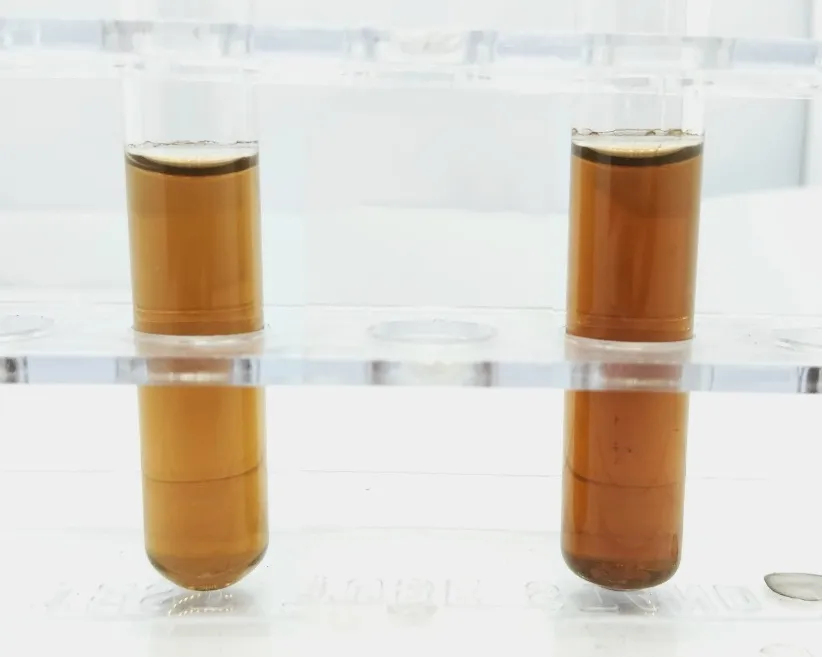
- Sample Preparation
- Take samples in one or two test tubes, if more than one samples are being tested for the same target heavy metal ion.
- Add AgNS to the test tubes (type of nanosensor based on the target heavy metal ion).
- Take pure water in another test tube and add AgNS to it (type of nanosensor based on the target heavy metal ion).
- Place the test tubes in SmartDetect chamber, having the test tube with pure water on the left and the rest of the test tubes on the right.
- Allow color to develop (typically from 20 to 30 minutes).
- Image Capture Guidelines
- Use consistent, good lighting; avoid shadows and glare.
- Position the camera directly above the nanosensor sample for a flat view.
- Keep the image sharp and in focus (use tripod if necessary).
- Ensure the nanosensor region occupies a significant part of the frame.
- Use high resolution and avoid heavy compression artifacts.
- Prefer a neutral, plain background to minimize color interference
Using the Web Interface
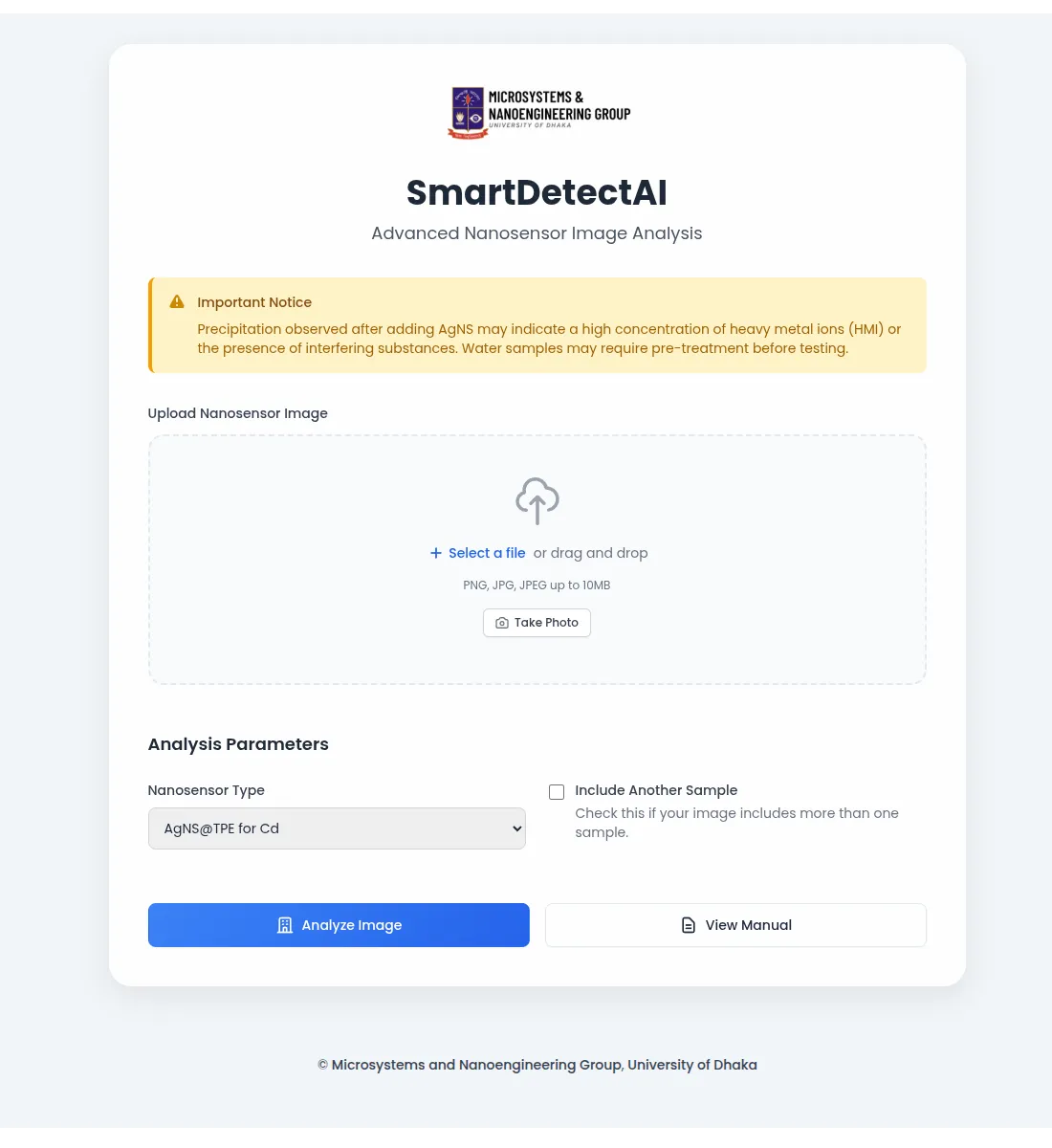
- Upload images by drag-and-drop or file selector.
- Use the Take Photo button (mobile devices preferred) to capture live images.
- Adjust contrast, brightness, and threshold sliders if needed.
- Preview images before submission.
Important: Modern smartphones require HTTPS-secured web pages to grant access to the device camera. To use the Take Photo feature within the web interface, ensure you are accessing the app via HTTPS (secure connection). Self-signed certificates or valid SSL certificates are needed to enable camera access.
- Interpreting Results
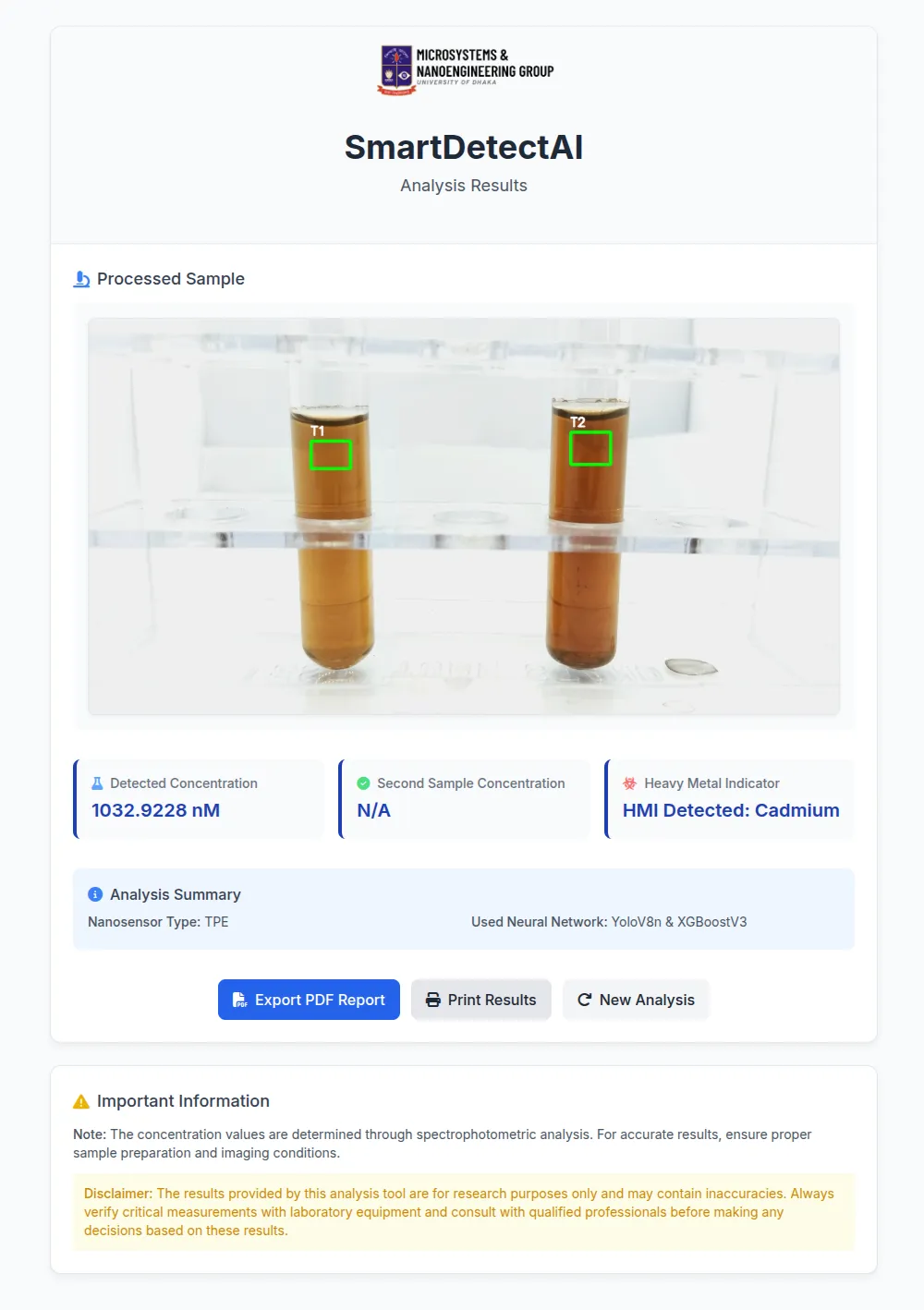
- Results are shown in nanomolar (nM) units.
- Predictions are most accurate within the trained range (e.g., 500–15,000 nM).
- Expect minor variation due to environmental matrix interference at low titers.
- SmartDetect is calibrated to AAS readings using pure water; in complex matrices like pond or tap water, accuracy may vary slightly.
- Best Practices & Tips
- Always use a fresh baseline for each experiment session.
- Ensure samples are mixed thoroughly before imaging.
- Maintain consistency in lighting and image angle.
- Use clean, transparent test tubes for better ROI detection.
- If results seem erratic, retake the image or repeat the sample with better lighting.
Troubleshooting
ROI not detected
Possible Cause: Poor lighting or blurry image
Solution: Retake image in bright, diffuse lighting
Note: Ensure steady camera and avoid glare
Unexpected concentration
Possible Cause: Contaminated baseline or test sample
Solution: Prepare fresh reagents; repeat the test
Note: Use clean test tubes for samples
Inconsistent results
Possible Cause: Baseline missing or too old nanosensor
Solution: Always use a recent control sample
Note: Store reagents properly to maintain quality
Upload error
Possible Cause: File size too large or unsupported format
Solution: Use
.jpgor.pngfiles under 10 MBNote: Check upload limits on the web interface
Webpage not responsive
Possible Cause: Slow network or heavy assets loading
Solution: Check internet connection and clear browser cache, restart the browser.
Note: If the app is running on your local machine restart it.
Webpage appears broken
Possible Cause: Tailwind CSS not loading properly
Solution: Ensure Tailwind CSS is correctly linked; check browser developer console for errors
Note: Verify Tailwind build steps if using Tailwind CLI or bundler
Can Not Access Camera on smartphones
Possible Cause: No HTTPS certification is used.
Solution: Ensure HTTPS protocol is used, generate a self-signed key if you are running the app on your local machine.
Note: Check your URL to ensure which protocol you are using.
For detailed setup instructions and troubleshooting, please refer to the GitHub Repository
- FAQs
Q: Can I use this for other heavy metal ions?
A: Not currently. SmartDetect is trained for Cd²⁺ only. Multi-ion support is under development.
Q: What’s the lowest concentration it can detect reliably?
A: SmartDetect performs best above 500 nM, though it can detect lower with slightly higher error margins.
Q: Can I use a smartphone camera?
A: Yes! Ensure the lens is clean and image is steady and well-lit.
Important: Modern smartphones require HTTPS-secured web pages to grant access to the device camera. To use the Take Photo feature within the web interface, ensure you are accessing the app via HTTPS (secure connection). Self-signed certificates or valid SSL certificates are needed to enable camera access.
- Disclaimer
SmartDetect is intended for preliminary environmental screening and research. It is not yet certified for regulatory compliance or medical diagnostics. For legal or health-critical decisions, please confirm results with certified analytical techniques like AAS.